Lab 6 — Preventing Data Exfiltration Using Inline Web DLP
In Lab 5, Alex built a custom DLP detection engine capable of identifying sensitive payroll data. Now it is time to put that engine to work. In this lab, Alex configures an Inline Web DLP policy that blocks unauthorized uploads in real time — and Kevin attempts to upload the Dataparity payroll report to ChatGPT for AI analysis, only to be stopped by Inline Web DLP.
Dependency: This lab requires the Unified DLP Engine created in Lab 5 (DP Project Code). Complete Lab 5 before proceeding.
Scenario Overview
This lab demonstrates the complete Inline Web DLP workflow end-to-end:
| Step | What Happens |
|---|---|
| 1 | Alex creates a custom End User Notification (EUN) |
| 2 | Alex builds an Inline Web DLP policy using the Lab 5 engine |
| 3 | Kevin attempts to upload Dataparity_Q2_2025_Workforce_Financial_Summary.docx to ChatGPT |
| 4 | Inline DLP inspects, detects, and blocks the upload in real time |
| 5 | Kevin receives the custom EUN explaining the denial |
| 6 | Alex reviews the violation in Web Insight Logs |
Use the supplied payroll report to test the Lab 5 engine. DP Project Code requires all three dictionaries to match: Credit Cards AND ABA Bank Routing Number AND the custom DP Project Code dictionary, each with a count greater than zero. Payroll data or SSNs alone do not satisfy this engine.
Task 1 — Admin Experience: Configure Inline DLP Protection
Configure a custom EUN and an Inline Web DLP policy that uses the Lab 5 detection engine to block sensitive uploads.
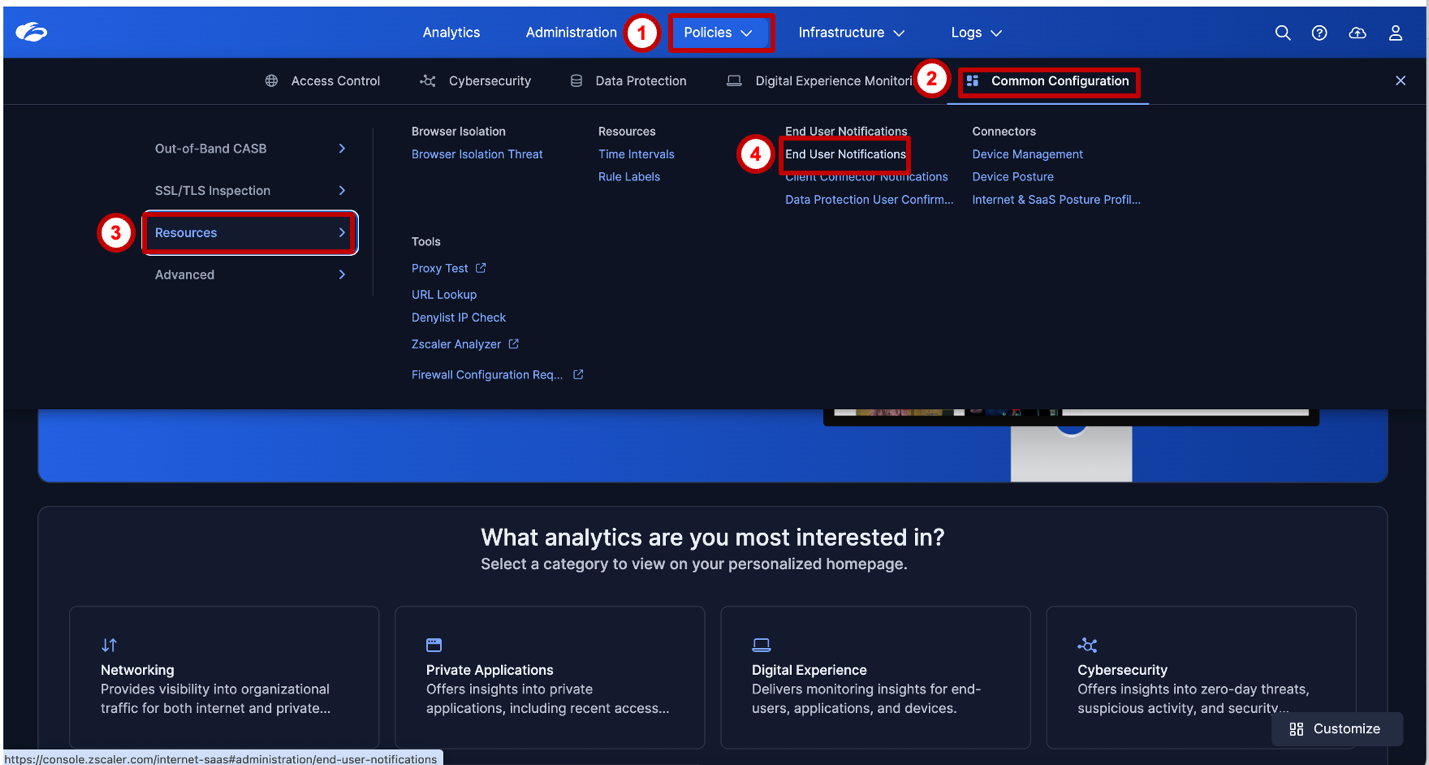
Step 1 — Navigate to End User Notification (EUN)
Alex creates a custom End User Notification to explain why uploads containing sensitive corporate data are blocked. Clear user coaching reduces helpdesk escalations and reinforces security awareness.
Navigate to:
Step 2 — Add a Custom EUN
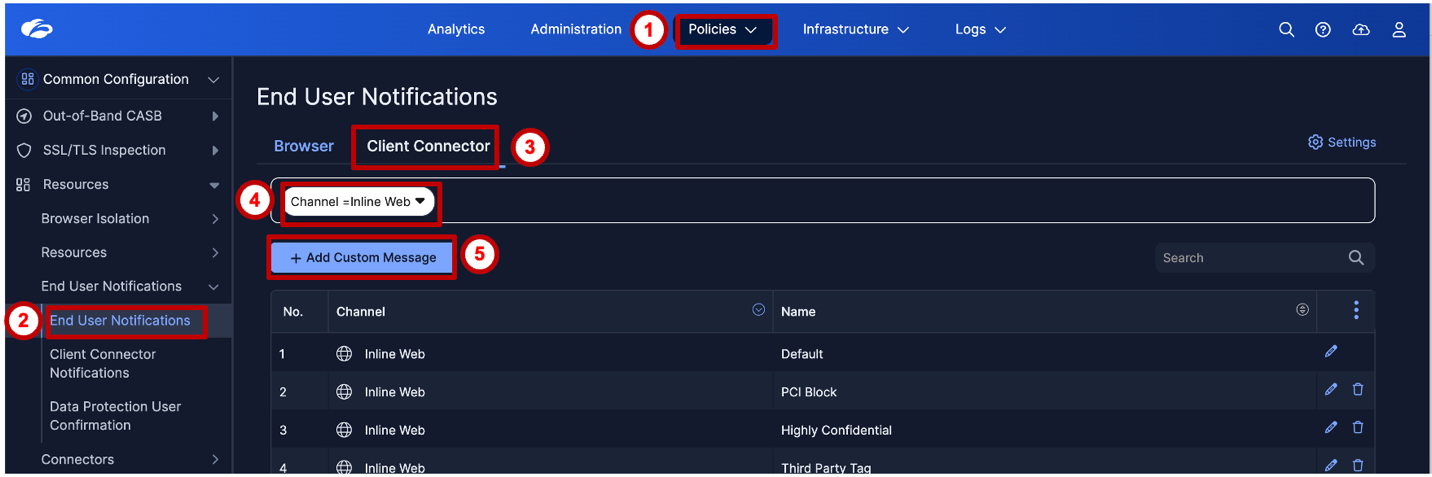
Navigate to the Client Connector tab and click Add Custom Message. Select channel Inline Web.
Step 3 — Add the Custom Message Text
Enter the message that will be displayed to end users when a policy violation occurs. The message should identify the policy, explain the reason for the block, and provide a contact path.
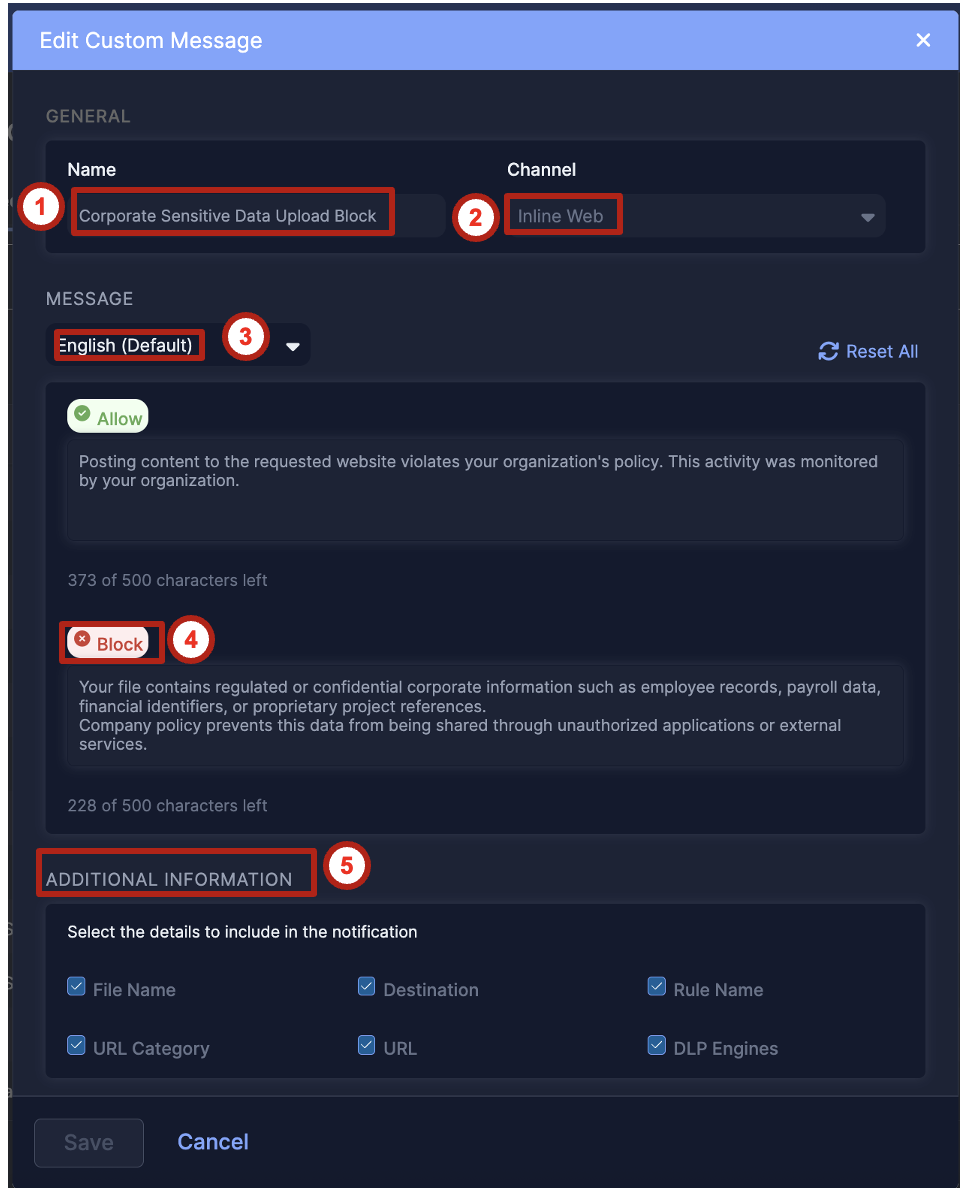
📝 Suggested message: "Your file upload has been blocked because it contains sensitive Dataparity information protected under our Data Security Policy. If you believe this is an error, please contact the Security team at security@dataparity.com."
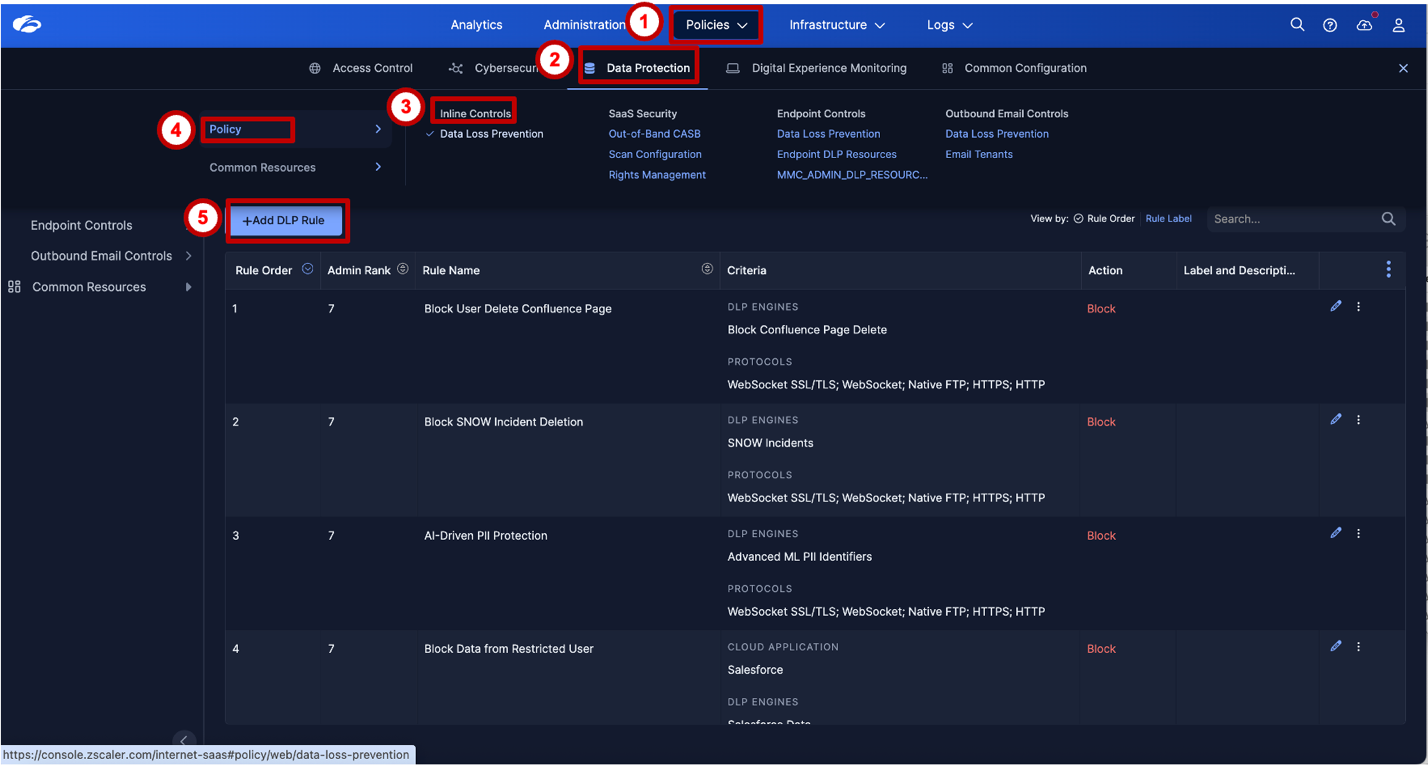
Step 4 — Navigate to Inline DLP Policy Creation
Navigate to the Inline DLP policy creation page:
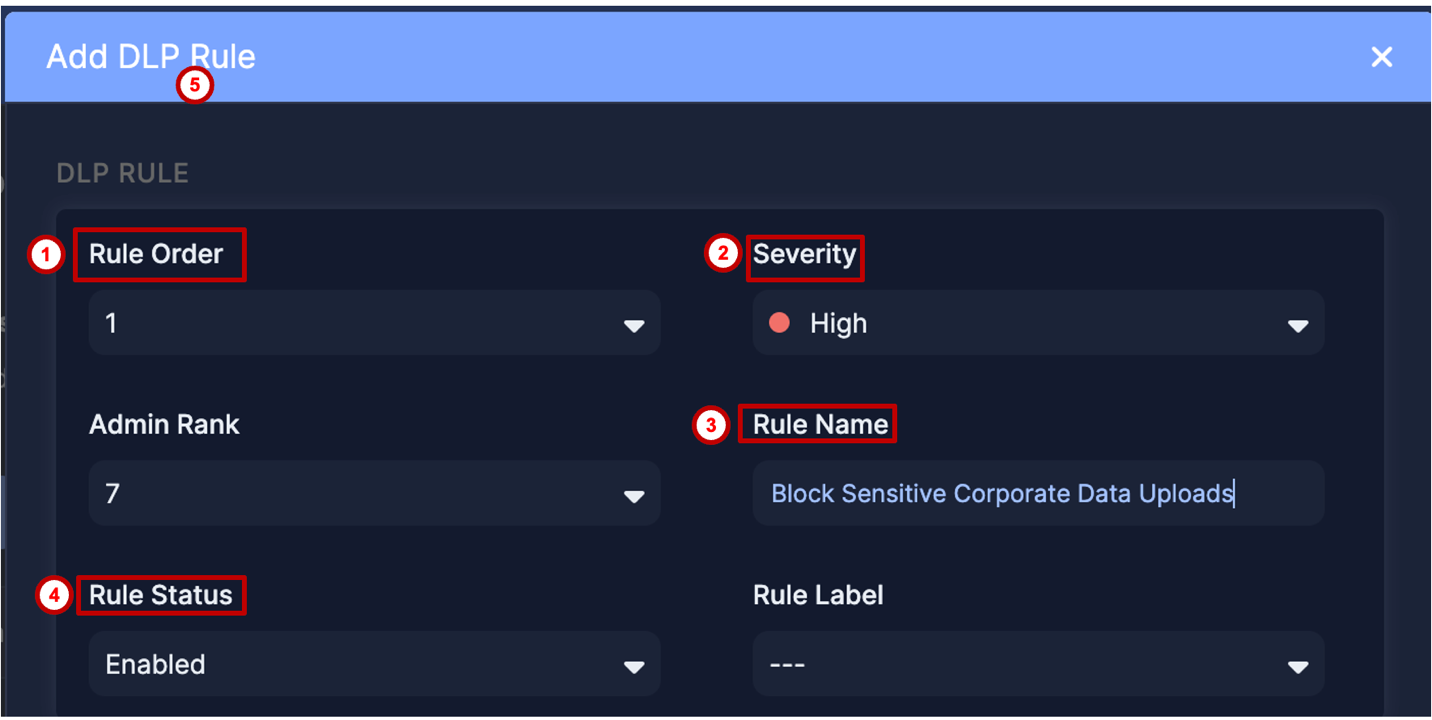
Step 5 — Configure Basic Policy Information
The policy window is large and split across multiple sections. The first section covers the foundational policy settings:
- Policy Name:
Block Sensitive Corporate Data Uploads - Rule Order: Set appropriately for your policy stack
- User Scope: All users (or scoped to the Dataparity employee group)
- Destination / Application Scope: Any destination for this lab (this includes sanctioned and unsanctioned destinations)
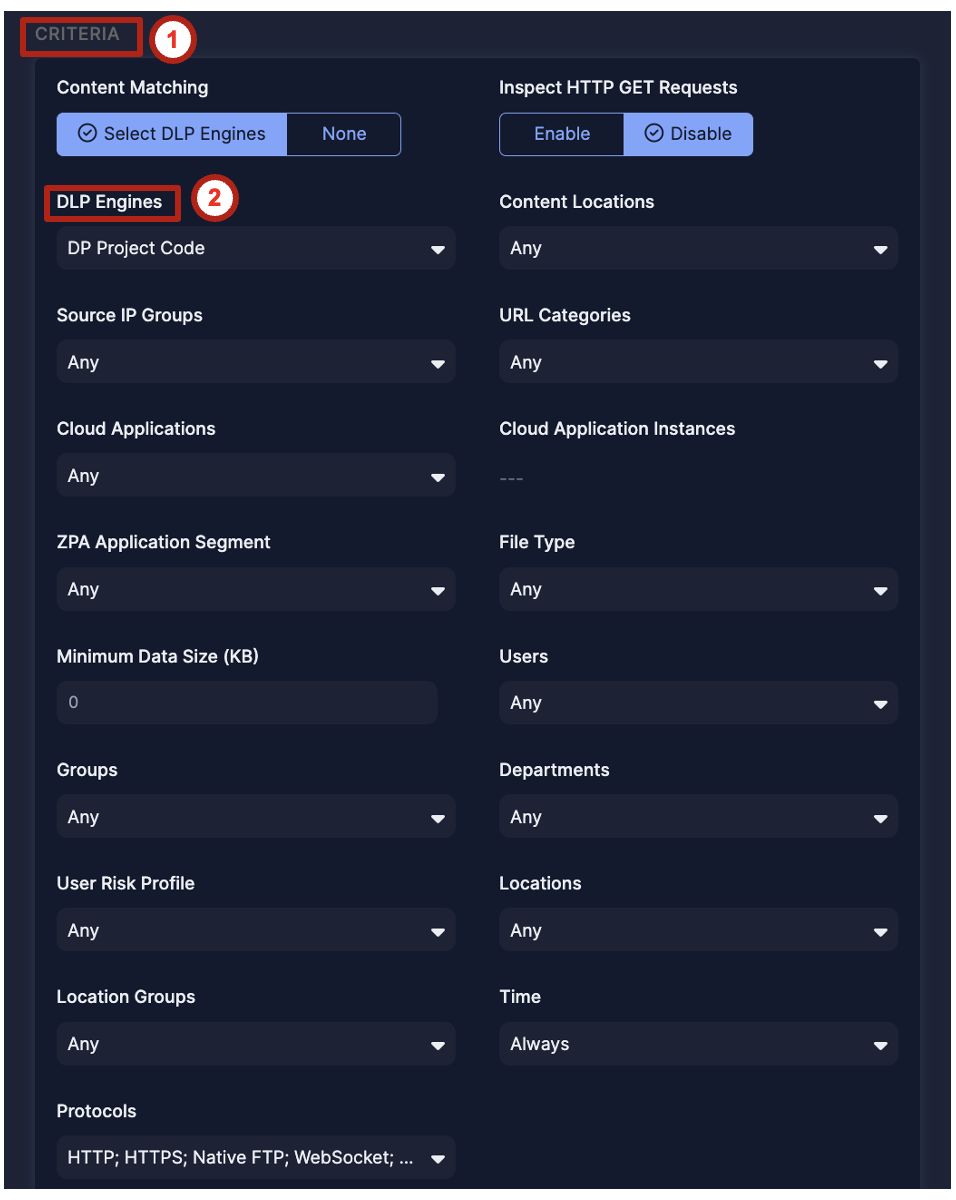
Step 6 — Configure Policy Criteria
In the Criteria section, select the Unified DLP Engine created in Lab 5 — DP Project Code.
This is the key connection point: the detection logic built in Lab 5 is now referenced by an enforcement policy. Lab 7 reuses this engine for Endpoint DLP; Lab 8 uses separate, preconfigured browser policies.
Step 7 — Configure Policy Action
In the Action section:
- Set Action = Block
- Select the End User Notification created in Steps 1–3
This completes the Detection → Enforcement → User Coaching → Logging chain.
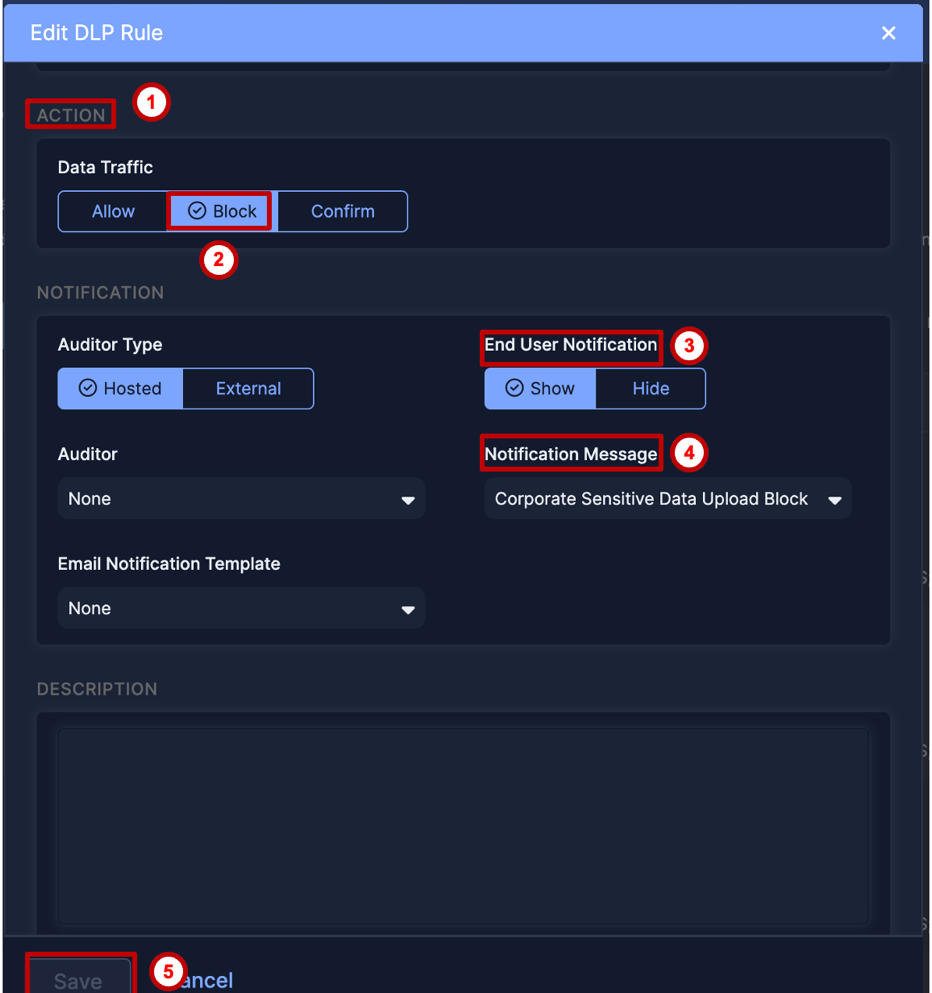
Detection → Enforcement → User Coaching → Logging. This four-step chain is the hallmark of a mature DLP deployment. Detection identifies the risk. Enforcement stops the action. User coaching reduces recurrence. Logging creates an audit trail for investigation.
Most organizations start with detection and logging only (alert mode). The shift to Block + EUN is when DLP moves from visibility to active protection.
Task 2 — User Experience: Prevent Data Exfiltration
Attempt to upload the payroll report to an unsanctioned website and observe the real-time block and user notification.
This task must be performed from the lab VM machine. Complete Pre-Requisites for Module 2, Parts 1–3: verify Inspect for the lab's HTTPS traffic in Part 2, Step 5; confirm ZCC is authenticated with its service ON and all modules active; and verify traffic steering at ip.zscaler.com.
Step 8 — Attempt the Upload
Kevin opens a browser on the lab VM and navigates to https://chatgpt.com — a GenAI platform — to get an AI-powered analysis of the sensitive data.
No ChatGPT account? If a login is required and you cannot or prefer not to sign in, try one of these alternatives, subject to its current account and upload requirements:
- 4shared — https://www.4shared.com
- WeTransfer — https://wetransfer.com
- Box (personal/free) — https://www.box.com
Upload flows and notifications can vary by application. Verify that your chosen destination is covered by the policy and SSL inspection, then confirm the DLP block in your own Web Insights event.
He selects Dataparity_Q2_2025_Workforce_Financial_Summary.docx from the desktop and initiates an upload.
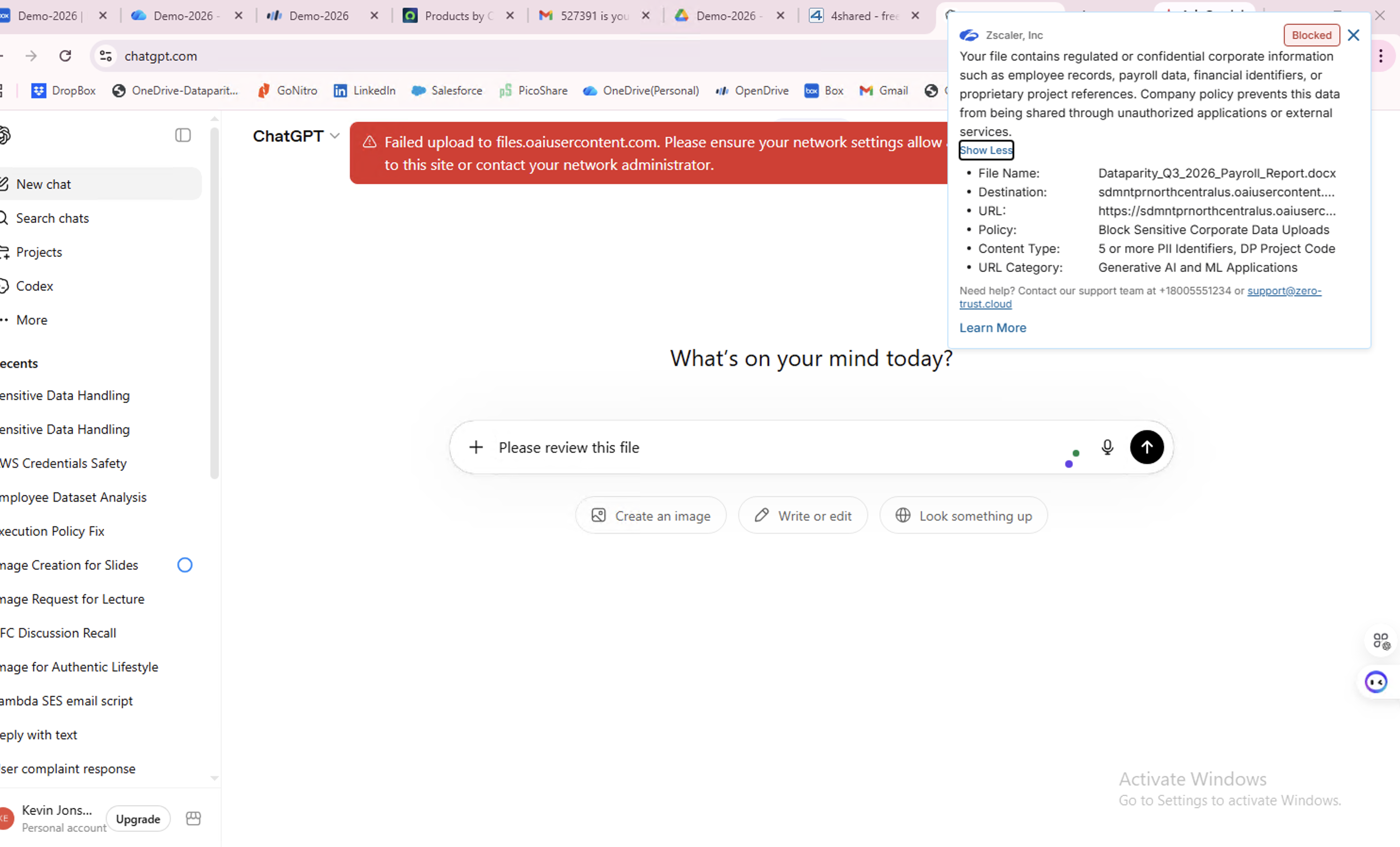
Expected result when the upload is inspected and matches the policy:
- The lab VM's upload traffic is steered through Zscaler with SSL inspection
- Inline DLP inspects the file content
- The DP Project Code engine matches all three dictionary conditions
- The policy blocks the upload; verify the notification and corresponding Web Insights event
Step 9 — Kevin Receives the Block Notification
Instead of a successful upload confirmation, Kevin sees the custom End User Notification Alex configured in Task 1.
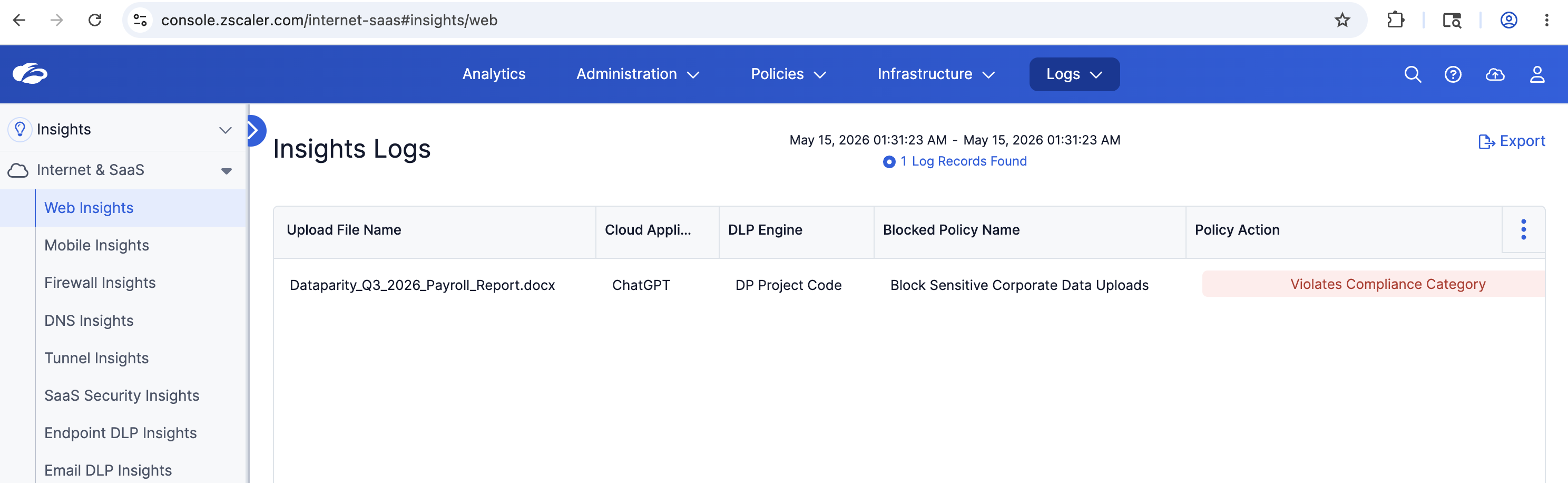
Task 3 — Admin Experience: Review Web Insight Log
Validate that the DLP event was correctly logged in Web Insight with full metadata.
Step 10 — Navigate to Web Insight Logs
Navigate to the Web Insight log viewer:
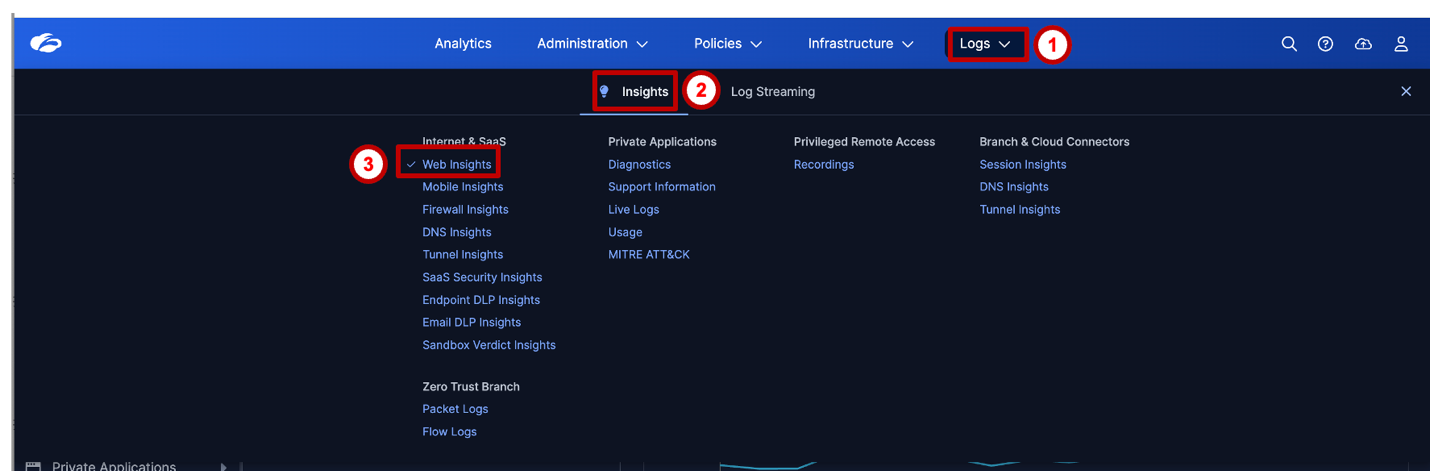
Step 11 — Apply DLP Engine Filter
Apply a filter to isolate DLP-triggered events:
Filter: DLP Engine = DP Project Code
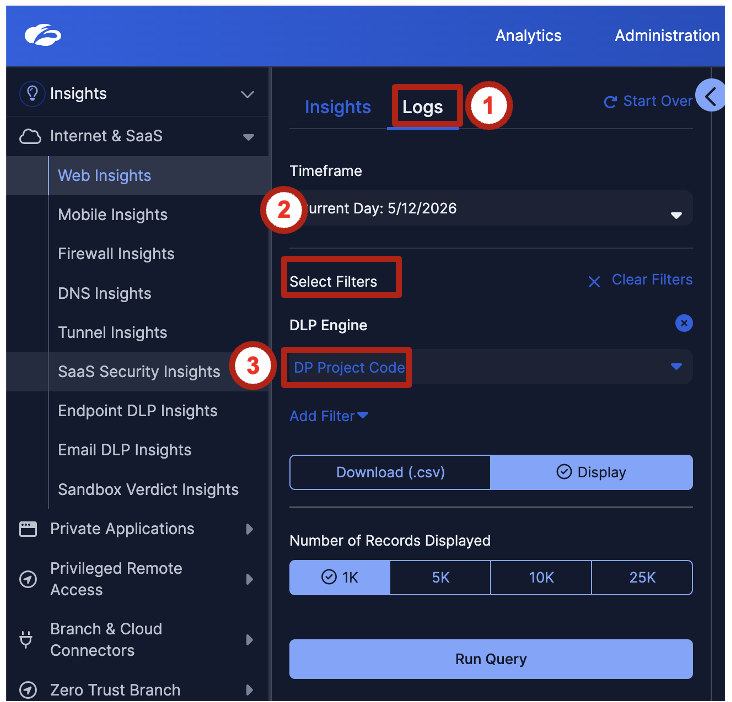
Step 12 — Review Violation Metadata
Locate your upload attempt using its time, signed-in lab identity, and chosen destination. Kevin is the scenario persona; your event should show the actual test identity. Expand the matching event to review the violation record:
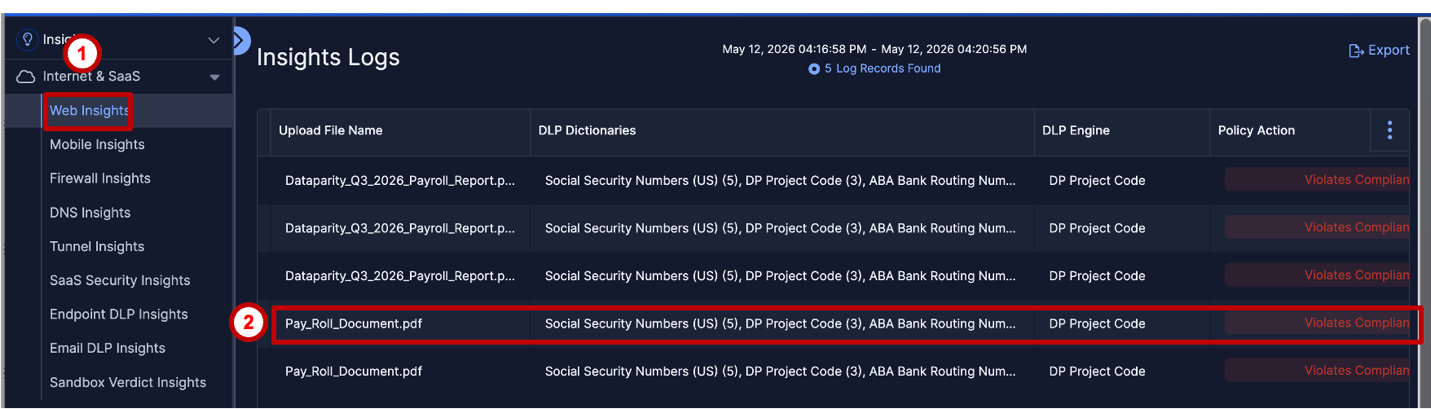
The values below are examples, not a required literal match to the screenshot. Verify your actual identity, VM/IP, chosen destination, rule, engine, file, and action. Display labels and screenshot values can vary.
| Field | Example / What to Verify |
|---|---|
| User Identity | Your signed-in lab identity (playing Kevin) |
| Source Device / IP | Your lab VM / source IP |
| Cloud Application | ChatGPT, or your chosen upload application |
| Policy Triggered | Your rule: Block Sensitive Corporate Data Uploads |
| DLP Engine Matched | Your Lab 5 engine: DP Project Code |
| File Name | Your test file: Dataparity_Q2_2025_Workforce_Financial_Summary.docx |
| File Type | Microsoft Word / DOCX (display label may vary) |
| URL Category | For example, Generative AI and ML Applications for ChatGPT; verify your destination's category |
| Action Taken | Verify Blocked for this test |
This step focuses on event metadata rather than matched content. Lab 9: ZWA SOC Triage switches to the read-only Enterprise Tenant, where Priya reviews prepopulated incidents and their trigger data. Those are separate incidents, not the Lab Tenant event you generated here.
- The policy used Block. When would Alert-only be a better starting posture for a new DLP rule — and what metrics would you use to decide when to escalate to Block?
- Kevin uploaded to ChatGPT — a GenAI tool. How would the policy behave if he attempted the same upload to a sanctioned AI platform like Microsoft Copilot?
- The Web Insight log shows metadata but not trigger content at this stage. Why might you want to limit trigger visibility in the primary log view?
- The Lab 5 DLP engine is shared by Labs 6 and 7. What governance process would you use to control who can modify a shared detection engine?
GenAI uploads can expose sensitive corporate data. This lab uses the Lab 5 engine to block inspected uploads that match the configured Inline Web DLP policy. Confirm the result through the user notification and your own Web Insights event.
Lab 7 reuses the engine for Endpoint DLP Application File Access (AFA) and Clipboard controls. Lab 8 tests separate, preconfigured browser policies for copy-paste controls; it does not reuse this engine.