Lab 5 — Detection Logic using DLP Engine
Module 2 requires the Lab Tenant and a configured Zscaler Client Connector on the VM. Before proceeding, go to Pre-Requisites for Module 2 and complete:
- Part 1 — Access Your Lab Environment
- Part 2 — Configure Zscaler Client Connector (Lab Tenant), including Step 5: verify that SSL inspection uses Inspect for the lab's HTTPS traffic
- Part 3 — Setup VM and Login to ZCC
📌 Once ZCC is authenticated, its service is ON, all modules are active, and ip.zscaler.com confirms your traffic is tunneled — come back here and start Lab 5.
Dependency: The DLP engine created in this lab combines the custom dictionary with two predefined dictionaries and is referenced in Labs 6 and 7. Lab 8 uses preconfigured browser policies, not this engine. Complete all steps before moving to the next lab.
Build a custom dictionary and a DLP engine for the Web and Endpoint protection policies in Labs 6 and 7.
Step 1: Navigate to DLP Dictionaries and Review Predefined Dictionaries
Policies → Data Protection → Common Resources → Dictionaries & Engines
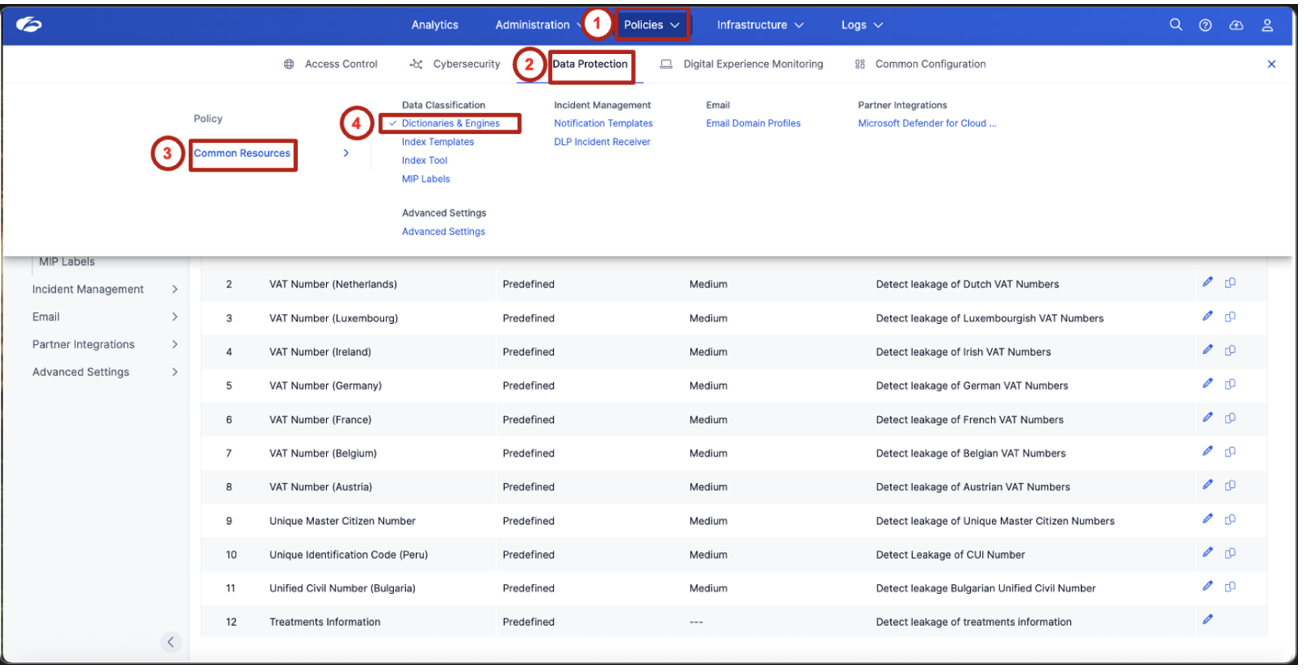
Review the list of predefined dictionaries. Locate and observe the following two dictionaries used in this lab:
- Credit Cards
- ABA Bank Routing Number
These predefined dictionaries require no changes — you will add them directly to the DLP engine in Step 3.
These predefined dictionaries provide built-in detection capabilities for commonly regulated data types — no configuration required to get started with standard compliance frameworks.
Step 2: Create a Custom DLP Dictionary
Build custom detection logic for organization-specific sensitive data.
Click Add DLP Dictionary and configure with the following settings.
| Field | Value |
|---|---|
| Name | DP Project Code |
| Dictionary Type | Patterns & Phrases |
| Match Type | Match Any |
| Enable Proximity | Enabled |
| Proximity Length | 200 |
Add the following detection patterns:
Set the action to Count Unique.
Then add the following contextual phrases:
- Confidential
- Internal Only
- Salary
- Payroll
- Project Codes
- Internal
Set the phrases' action to Count All, then click Save to save the custom dictionary.
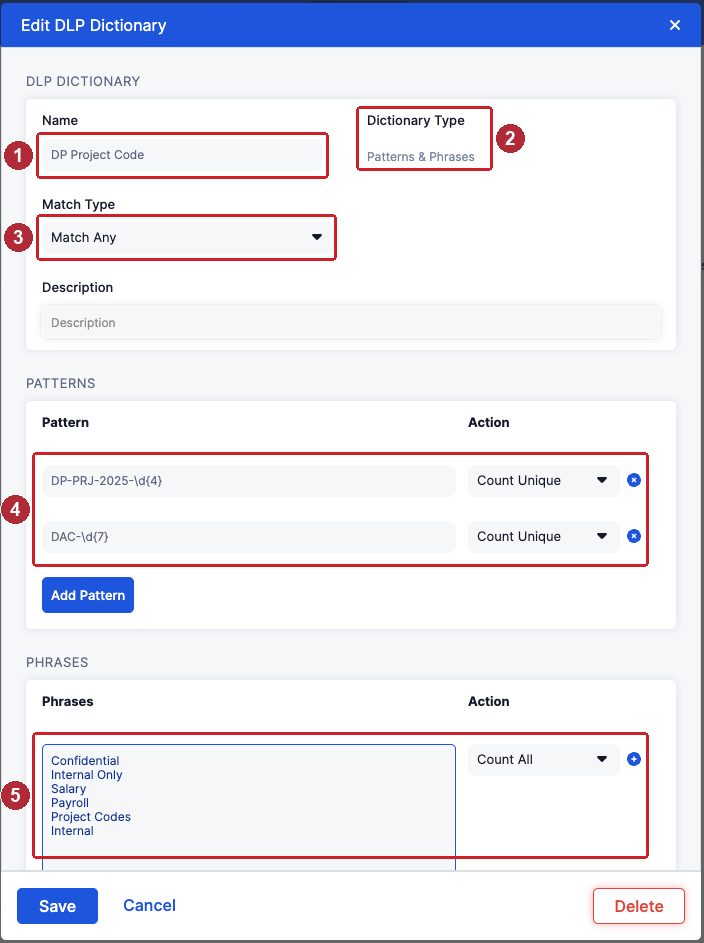
Custom dictionaries allow organizations to detect proprietary identifiers that are not covered by standard compliance templates — project codes, internal classifications, or domain-specific terminology unique to your business.
Step 3: Create a Detection Logic using a DLP Engine
Combine multiple detection signals into a single classification rule.
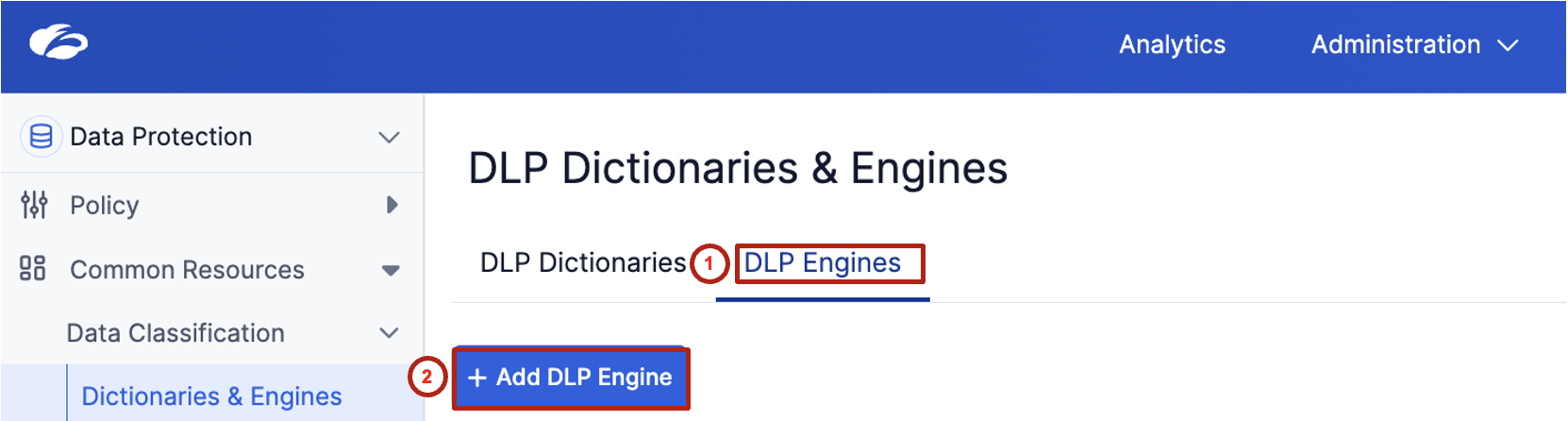
Switch to the DLP Engines tab, then click + Add DLP Engine.
| Field | Value |
|---|---|
| Name | DP Project Code |
| Operator | ALL |
Under Channels, select the following (leave DSPM unchecked):
- Endpoint DLP
- Inline Web
- SaaS Security
- Outbound Email DLP
Then add the following detection components, each with condition > 0:
- Credit Cards
- ABA Bank Routing Number
- DP Project Code
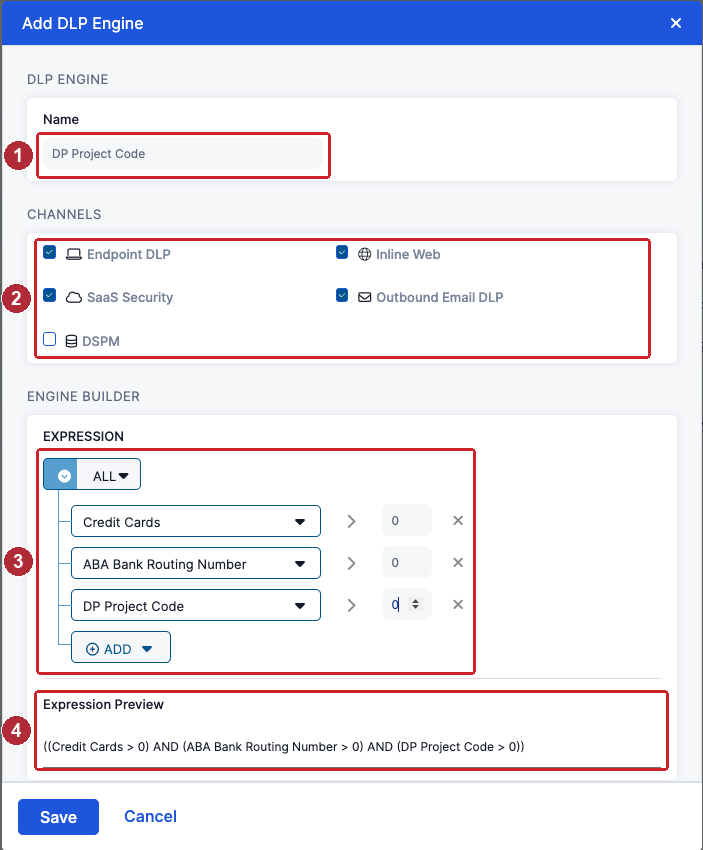
Review the expression preview. It should display:
((Credit Cards > 0) AND (ABA Bank Routing Number > 0) AND (DP Project Code > 0))
All three dictionaries must match: Credit Cards AND ABA Bank Routing Number AND the custom DP Project Code dictionary. Click Save to save the engine.
Step 4: Understand How Detection Logic Supports Enforcement
Connect detection logic to future protection scenarios.
This detection logic will be reused in the following labs:
| Lab | Channel | Action |
|---|---|---|
| Lab 6 | Web | Block sensitive data uploads |
| Lab 7 | Endpoint | Block Application File Access (AFA) and Clipboard transfers |
Lab 8 separately tests preconfigured browser policies for copy-paste controls; it does not reuse this engine.
- Why is it important to combine multiple detection signals instead of relying on a single identifier?
- How does proximity detection reduce false positives?
- What types of organization-specific identifiers should be added to custom dictionaries?
- How does this detection logic support consistent protection across Web and Endpoint environments?
Detection logic defines what is sensitive. Policies define what to do about it.
The DP Project Code engine combines three dictionaries with AND logic and is reused by the Web policy in Lab 6 and the Endpoint policies in Lab 7. Lab 8 demonstrates separate, preconfigured browser controls.