Lab 2 โ SaaS Security Posture & Third-Party Application Governance
Assess Dataparity's SaaS security posture, identify misconfigurations and compliance gaps, and review third-party OAuth applications with access to corporate data.
Business Scenarioโ
Dataparity has standardized on approved corporate SaaS applications for collaboration, file sharing, CRM, and productivity workflows.
The security team must ensure:
- Users only interact with sanctioned SaaS tenants
- Sensitive data is governed consistently
- SaaS environments remain securely configured
- Misconfigurations are detected continuously
- Third-party applications and browser extensions are monitored for risk
The organization wants centralized visibility into SaaS posture, compliance alignment, and external integrations that may introduce data exposure risks.
Task 1 โ SaaS Security Posture Management (SSPM)โ
Backgroundโ
Once sanctioned SaaS access is established, organizations must continuously evaluate the security posture of those SaaS environments.
SSPM provides visibility into:
- Misconfigurations โ settings that deviate from security best practices
- Security control failures โ controls that were once passing and have regressed
- Compliance gaps โ requirements not met under SOC 2, ISO 27001, NIST, or CIS
- Configuration drift โ how posture has changed over time and what triggered it
- Risk exposure trends โ whether the organization's SaaS posture is improving or deteriorating
Step 1 โ Navigate to the SSPM Portalโ
Navigate to:
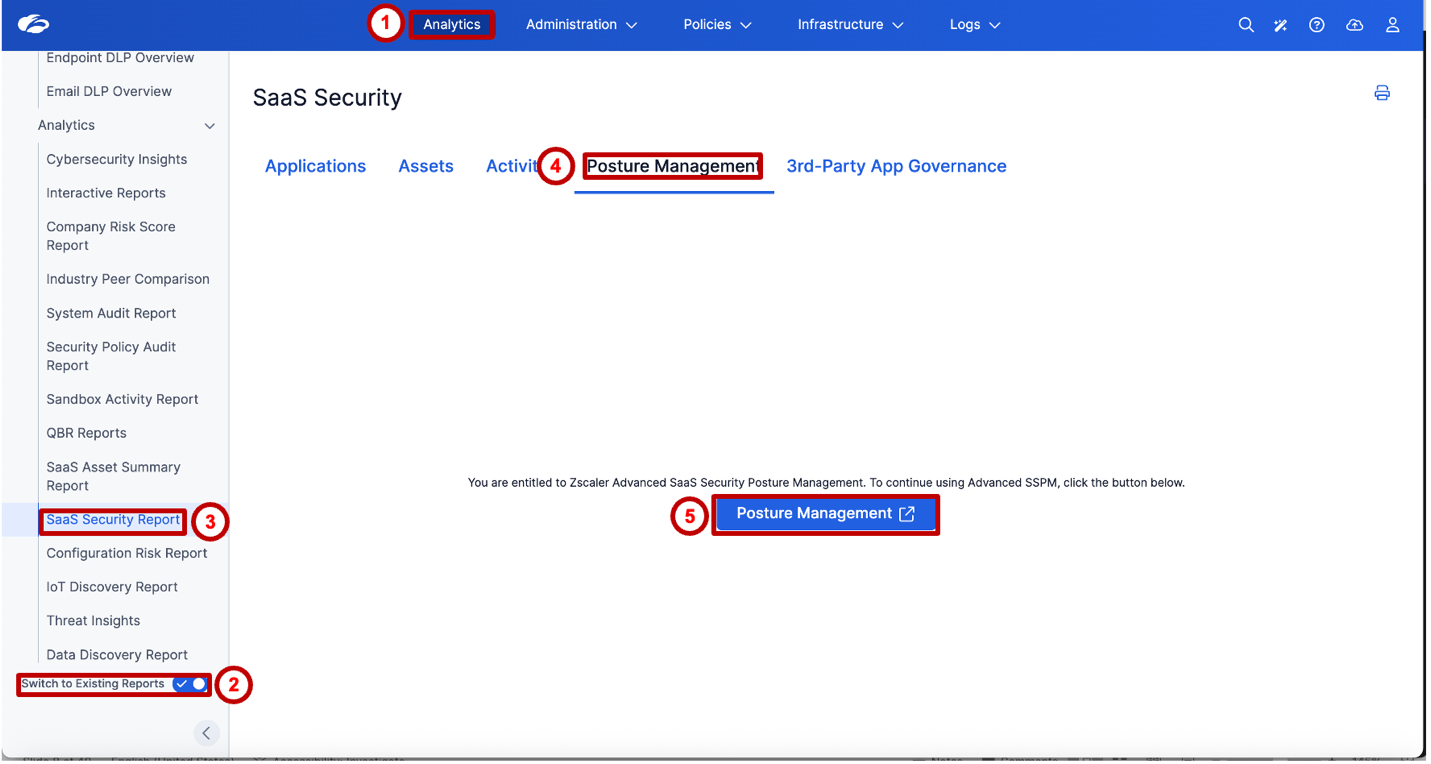
Analytics โ SaaS Security Report
At the bottom-left of the page, enable the Switch to Existing Reports toggle. Then select the SaaS Security Report from the left navigation.
On the SaaS Security page, click the Posture Management tab, then click the Posture Management โ button to launch the advanced SSPM portal at apptotal.zscaler.com.
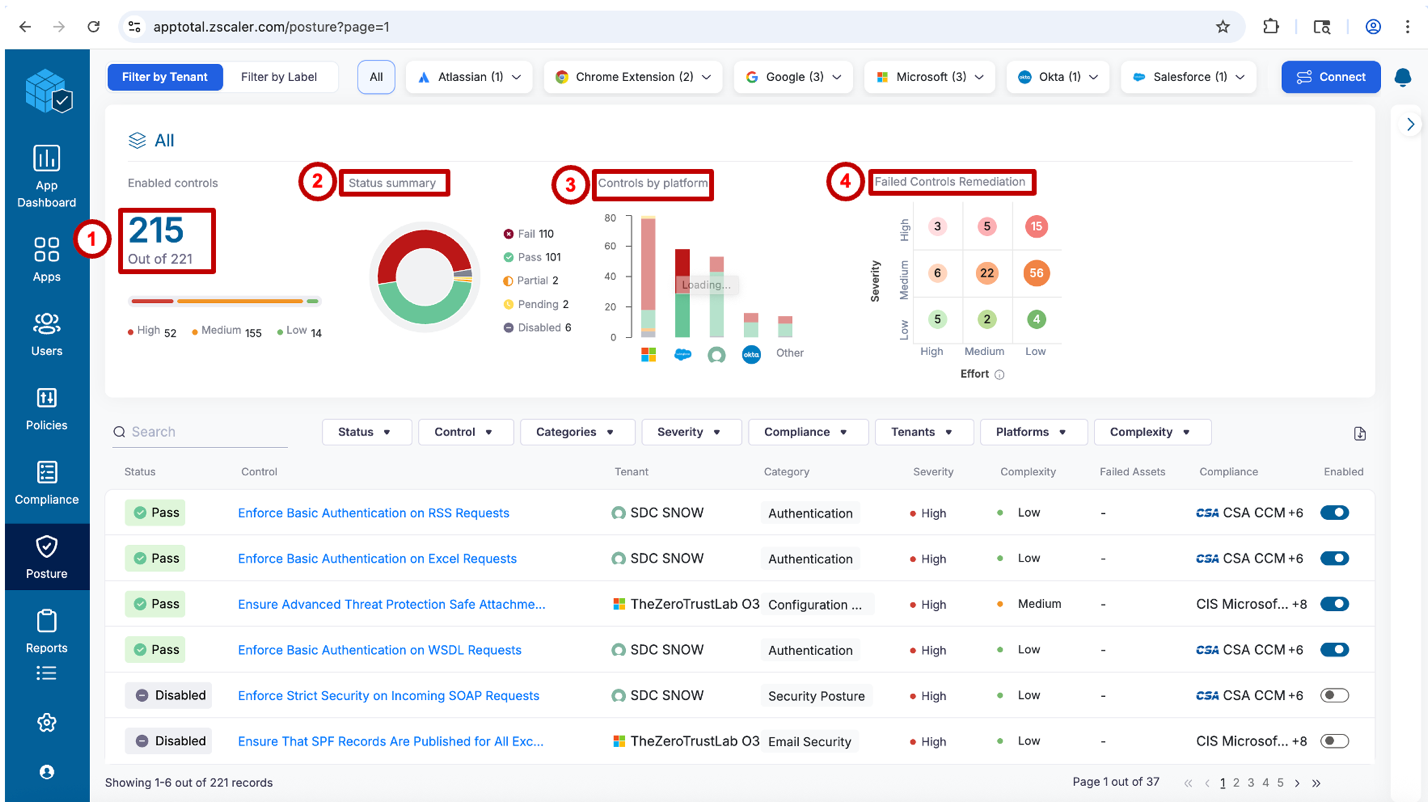
The SSPM portal opens as a separate application โ this is Zscaler's Advanced SaaS Security Posture Management experience. Note the top navigation filter bar showing tenants by platform (Atlassian, Chrome Extension, Google, Microsoft, Okta, Salesforce) โ each represents a connected SaaS tenant being continuously assessed.

Step 2 โ Review the SSPM Dashboardโ
The SSPM dashboard provides an immediate view of Dataparity's overall SaaS security posture across all connected platforms.
Review the following sections:
โ Enabled Controls The total number of active security controls being evaluated. Note the severity breakdown โ High, Medium, and Low controls contribute differently to overall risk exposure.
โก Status Summary A donut chart showing the distribution of control outcomes:
- Fail โ controls with active misconfigurations requiring remediation
- Pass โ controls meeting the security benchmark
- Partial โ controls partially satisfied
- Pending โ controls awaiting evaluation
- Disabled โ controls that have been turned off
โข Controls by Platform A bar chart breaking down pass/fail status by SaaS platform (Microsoft, Salesforce, Okta, and others). This view quickly identifies which platform carries the highest number of failures.
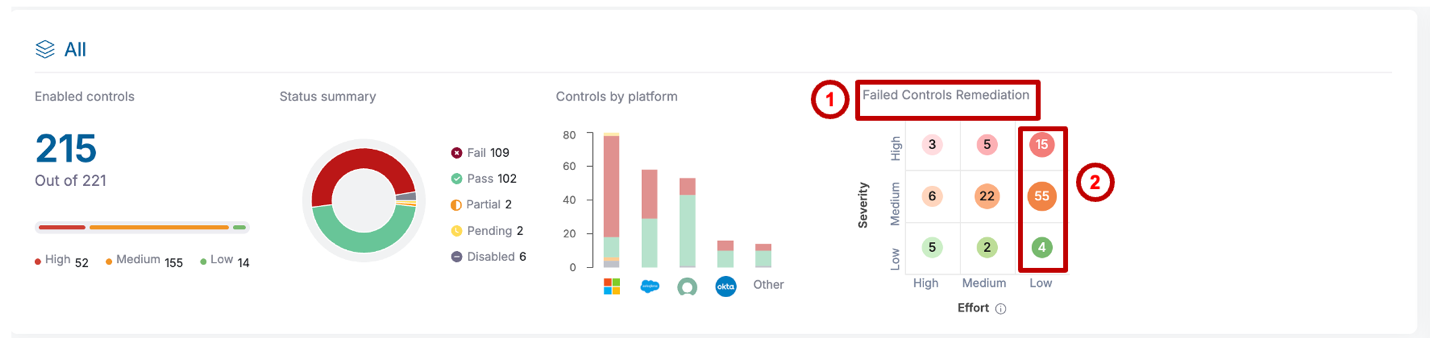
โฃ Failed Controls Remediation Matrix A Severity ร Effort priority grid. Controls in the High Severity / Low Effort cell are the highest-priority quick wins โ maximum security improvement with minimum remediation complexity.
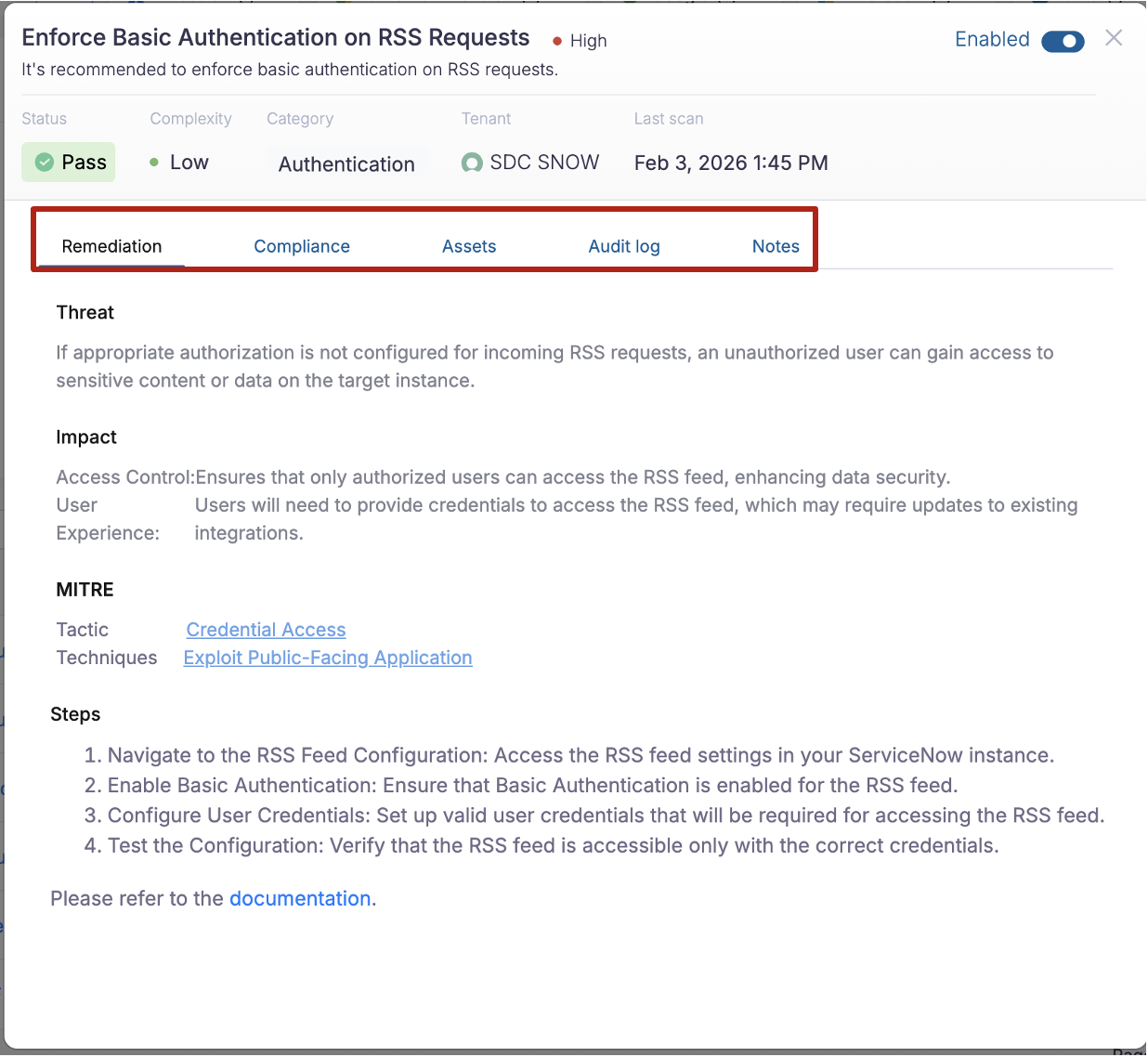
Select any control from the list below the summary to view its full detail.

In the control detail panel, review:
- Remediation โ threat description, impact, MITRE ATT&CK mapping (tactic and technique), and step-by-step remediation instructions
- Compliance โ which compliance framework controls this finding satisfies or violates
- Assets โ the specific resources or users impacted by this misconfiguration
- Audit log โ history of status changes for this control over time
- Notes โ space for team collaboration and remediation tracking

The MITRE ATT&CK mapping in each control detail is a notable capability โ it connects a SaaS misconfiguration directly to the adversary tactic and technique that could exploit it. For example, a missing RSS authentication control maps to Credential Access โ Exploit Public-Facing Application. This bridges the gap between posture management and threat modeling.
Step 3 โ Review the Failed Controls Remediation Matrixโ
The Failed Controls Remediation Matrix is a prioritization tool that helps security teams decide where to focus remediation effort first.
The matrix plots controls on two axes:
- Y-axis (Severity): High โ Medium โ Low โ the risk impact of leaving this control unresolved
- X-axis (Effort): High โ Medium โ Low โ the complexity of remediating the control
Controls in the top-right cell (High Severity, Low Effort) represent the optimal starting point โ they provide the greatest risk reduction for the least remediation work.

Ask the group: "If you had one afternoon to improve your SaaS posture score, where would you start?" The matrix answers that question automatically โ it surfaces the highest-impact, lowest-effort remediations without requiring manual triage. This is the operationalization of risk-based prioritization.
Step 4 โ Review Compliance Mappingโ
From the left navigation, select Compliance.
The Compliance view shows how SSPM controls map to major security and privacy frameworks. Toggle between two perspectives:
Frameworks view Browse coverage by framework โ PCI DSS, NIST Rev.5, ISO 27001, and others. Each framework shows total controls, how many have passed, and how many have failed. Expand a framework to see individual control mappings.
Platforms view Switch to the Platforms tab to see compliance status filtered by SaaS platform (e.g., Google Workspace, Microsoft 365). Identify which platform is introducing the most compliance failures across your active frameworks.
The right panel shows a control-by-control mapping table โ Framework, Control ID, Security Check count, Status, and Tenant.
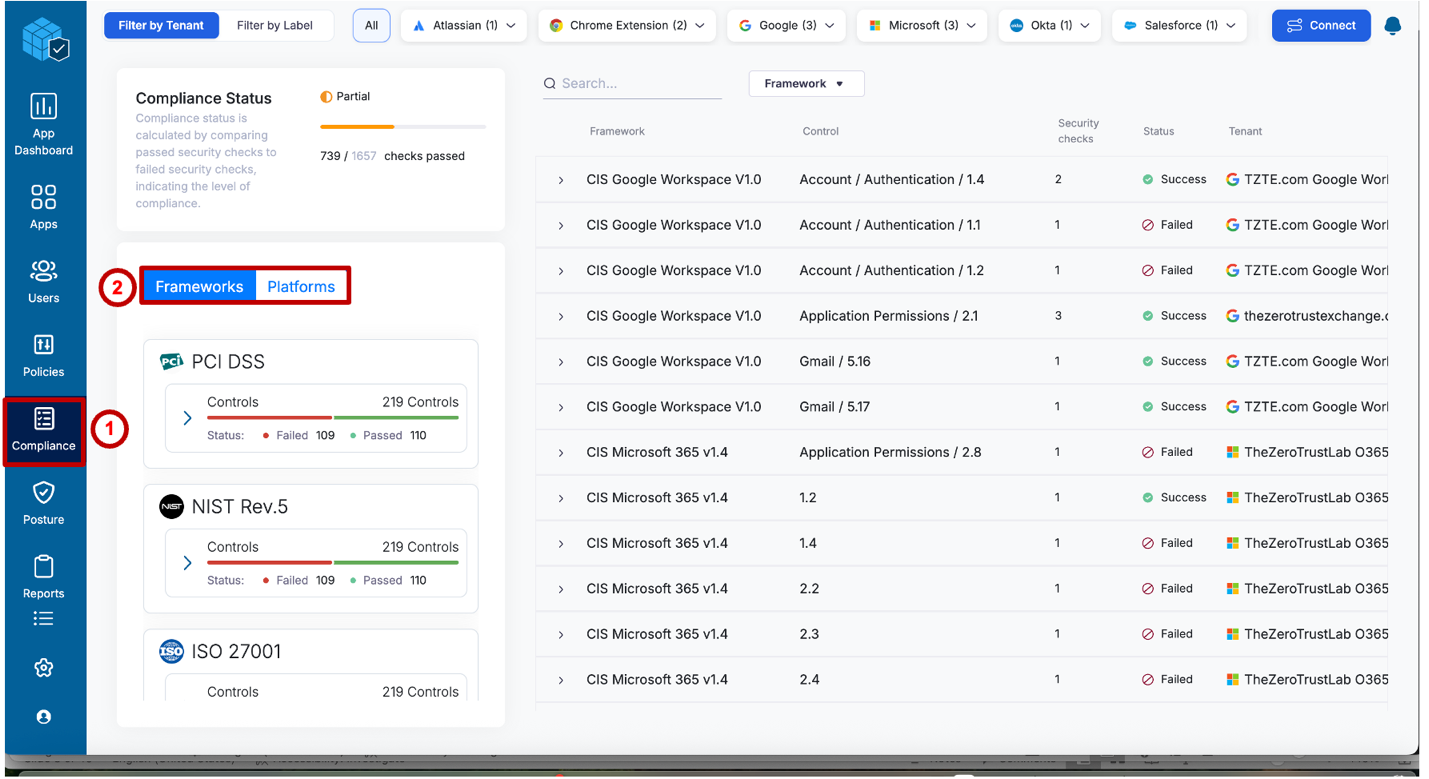
Compliance mapping helps organizations address three practical challenges:
- Align SaaS posture with governance requirements โ each SSPM finding is already labeled with the framework control IDs it affects, so security and GRC teams share a common language
- Simplify audit preparation โ instead of manually cross-referencing tool output against audit checklists, teams export a pre-mapped control evidence package directly from SSPM
- Prioritize remediation activities โ when multiple failed controls compete for attention, compliance mapping reveals which remediations satisfy the most framework requirements simultaneously โ the highest-efficiency path to audit readiness
A single SSPM check โ for example, "Enforce MFA for all admin accounts" โ often maps simultaneously to NIST IA-2, SOC 2 CC6.1, CIS Control 6.5, and ISO 27001 A.9.4.2. Remediating one misconfiguration satisfies multiple framework requirements in a single action.
Task 2 โ Third-Party Application Governanceโ
Backgroundโ
Modern SaaS platforms are deeply interconnected with third-party applications through OAuth2 permission grants, API integrations, and browser extensions. Employees and administrators routinely connect productivity tools, automation platforms, and AI assistants to corporate SaaS environments โ often without formal security review.
These integrations may introduce:
- Excessive permissions โ scopes like
Mail.ReadorFiles.ReadWrite.Allgranted to low-trust third parties - Data exposure risks โ OAuth apps can silently access and transmit email, files, calendars, and contacts outside the organization
- Unauthorized access paths โ tokens persist after initial authorization and may outlive the employee's legitimate need
- Shadow IT concerns โ user-consented installs that bypass IT governance processes entirely
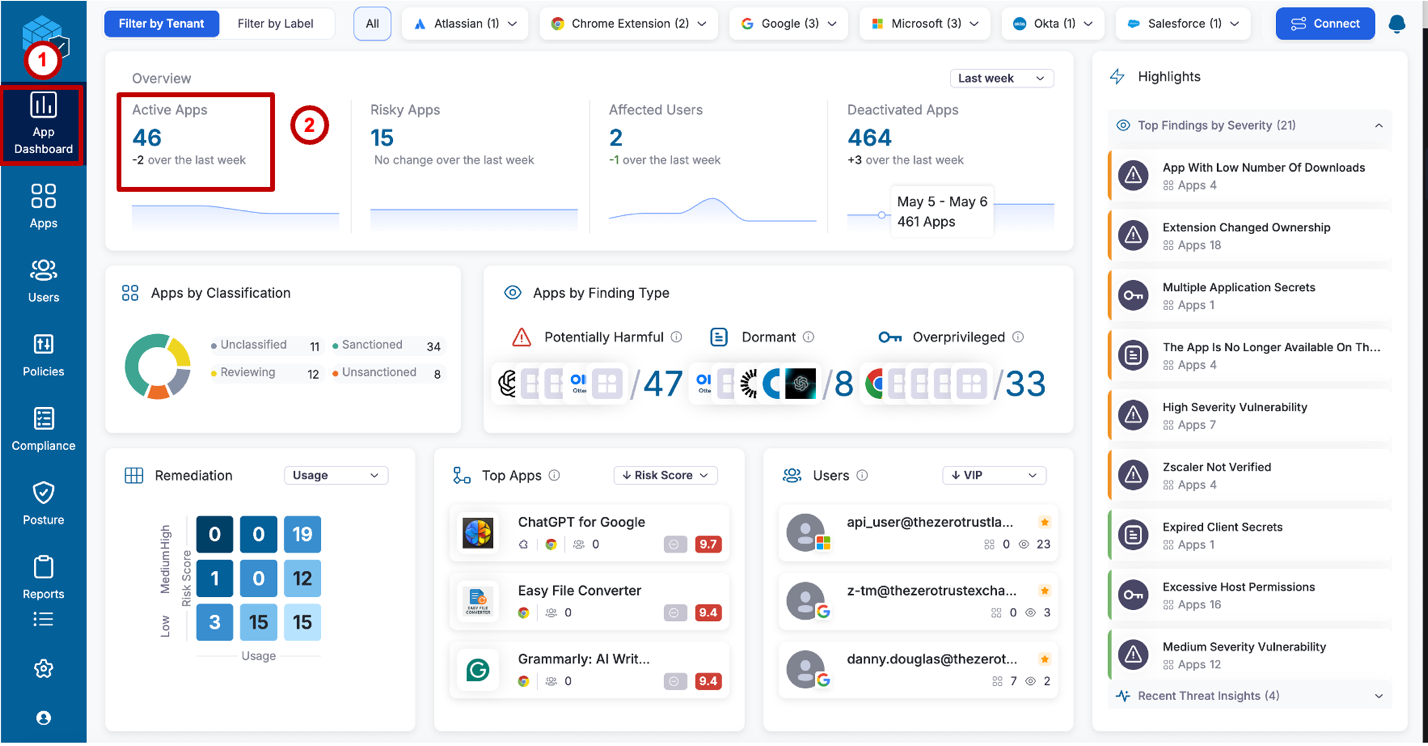
Step 5 โ Review the App Dashboardโ
From the left navigation pane in the SSPM portal, select App Dashboard.
Review the overview metrics:
- Active Apps โ total OAuth applications currently authorized across connected SaaS platforms
- Risky Apps โ apps flagged with elevated risk scores based on permissions, publisher reputation, or behavioral signals
- Affected Users โ number of users with at least one risky app authorized
- Deactivated Apps โ previously authorized apps that are no longer active
Below the metrics, review:
- Apps by Classification โ breakdown of apps as Sanctioned, Unsanctioned, Reviewing, or Unclassified
- Apps by Finding Type โ Potentially Harmful, Dormant, and Overprivileged app counts with representative app icons
- Top Apps by Risk Score โ highest-risk apps ranked by Zscaler's risk score (note: AI tools such as ChatGPT for Google, Grammarly, and similar extensions frequently appear here)
- Highlights panel โ recent threat findings surfaced across the app inventory (e.g., Extension Changed Ownership, Excessive Host Permissions, Expired Client Secrets)

Note the Top Apps by Risk Score list โ AI-powered tools such as ChatGPT for Google (9.7), Easy File Converter (9.4), and Grammarly (9.4) consistently rank near the top. These are browser extensions and OAuth apps that request broad page-reading permissions and transmit content to external AI inference APIs. Every SaaS page the employee views โ including payroll reports and customer data โ may be sent to a third-party AI service. This connects directly to Lab 4: Copilot Readiness later in this module.
Step 6 โ Review Active Apps and App Detailโ
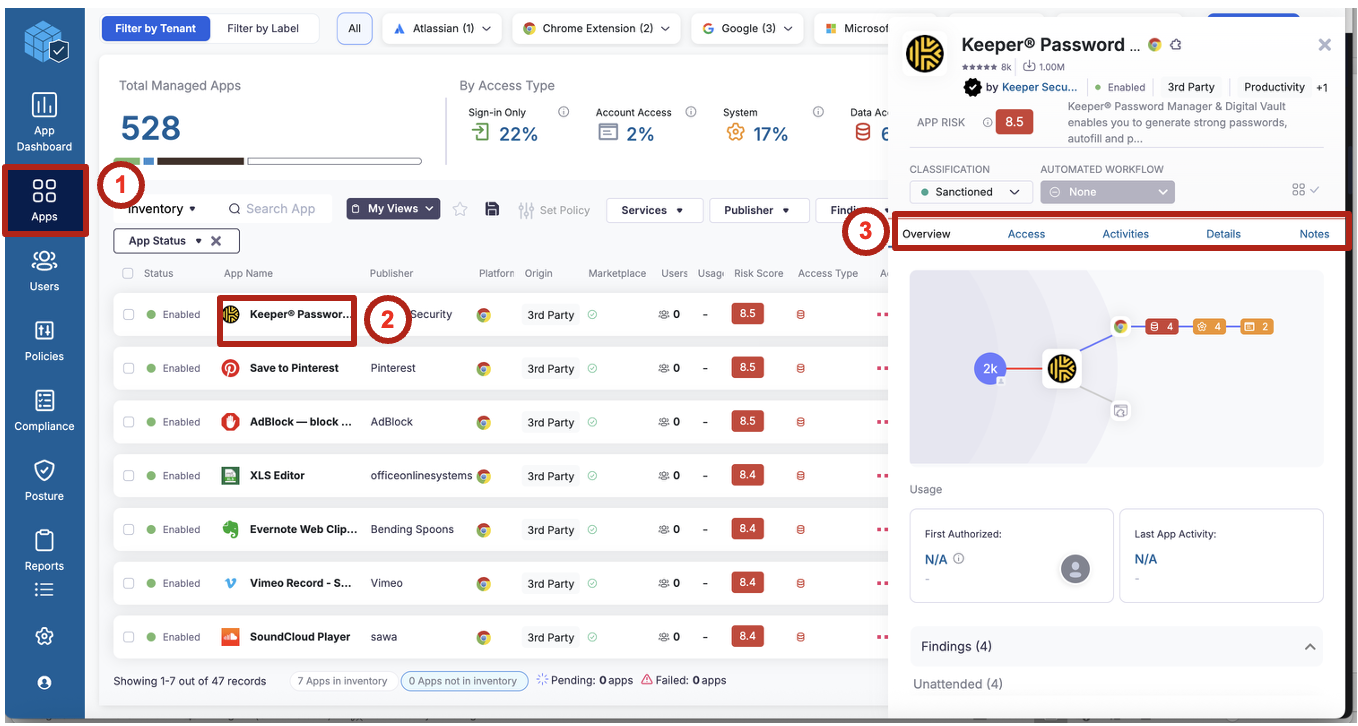
From the left navigation, select Apps, then click on Active Apps (filtered by App Status: Enabled).
The inventory shows all enabled third-party apps across Dataparity's SaaS estate. For each app, note:
- Publisher โ the developer or company behind the app
- Platform โ which SaaS marketplace the app originates from (e.g., Chrome Extension, 3rd Party)
- Users โ how many employees have this app authorized
- Risk Score โ Zscaler's composite risk rating (higher = greater concern)
- Access Type โ what level of access the app has been granted (Sign-in Only, Account Access, System, Data Access)
Click on any app โ for example, Keeperยฎ Password โ to open the detail panel. Review each tab:
- Overview โ app description, classification, risk score, connection graph showing OAuth relationships, and usage timeline (First Authorized, Last App Activity)
- Access โ specific permission scopes and OAuth grants
- Activities โ recent activity events associated with this app
- Details โ publisher information, marketplace metadata, and app findings
- Notes โ team annotation and review history

OAuth2 applications may gain persistent, silent access to a wide range of corporate data assets through their authorized scopes, including:
- Email โ full mailbox access, including the ability to read sensitive communications
- Files โ read, write, and share documents stored in OneDrive, SharePoint, or Google Drive
- Calendars โ meeting schedules, attendee lists, and location data
- Contacts โ full organizational directory and personal contact information
- SaaS administrative functions โ in elevated cases, apps with admin-level scopes can modify tenant settings or alter permission structures
OAuth2 grants bypass inline proxy controls entirely โ the data flows directly from Microsoft or Google to the third-party app server, never touching the Zscaler proxy. App Governance provides the only visibility into this channel.
Key Takeawaysโ
| Capability | What It Provides |
|---|---|
| Inline Controls | Govern SaaS access in real time โ tenant restrictions and instance awareness enforce which tenant employees can access |
| Instance Awareness | Enables tenant-specific policy โ same URL, differentiated by corporate vs. partner vs. personal instance |
| SSPM | Continuously evaluates SaaS security posture across all connected platforms with out-of-the-box controls |
| Remediation Matrix | Prioritizes failed controls by Severity ร Effort โ surfaces the highest-impact, lowest-effort remediations first |
| Compliance Mapping | Aligns SSPM findings to SOC 2, ISO 27001, NIST, and CIS โ a single remediation can satisfy multiple frameworks |
| Drift Analysis | Identifies unauthorized changes, configuration regressions, and newly introduced risk between audit cycles |
| App Governance | Surfaces OAuth apps and browser extensions that bypass inline controls โ the only visibility into this data path |
Summaryโ
Modern SaaS security requires both runtime inline protection and continuous posture governance.
Together, these capabilities help Dataparity:
- Protect sanctioned SaaS environments from access misuse and misconfiguration
- Reduce configuration risk through continuous automated assessment
- Govern third-party OAuth and browser integrations as first-class security objects
- Maintain continuous compliance visibility without manual audit overhead
What comes next: Lab 3 (DSPM) will discover where sensitive data โ including Payroll_2025.xlsx โ lives across cloud storage, building on the SaaS visibility established in this lab.